Session Sidebar — Repo/Folder Sub-Grouping
Sessions on the same machine are now automatically grouped by git repository (or working directory) in the sidebar.
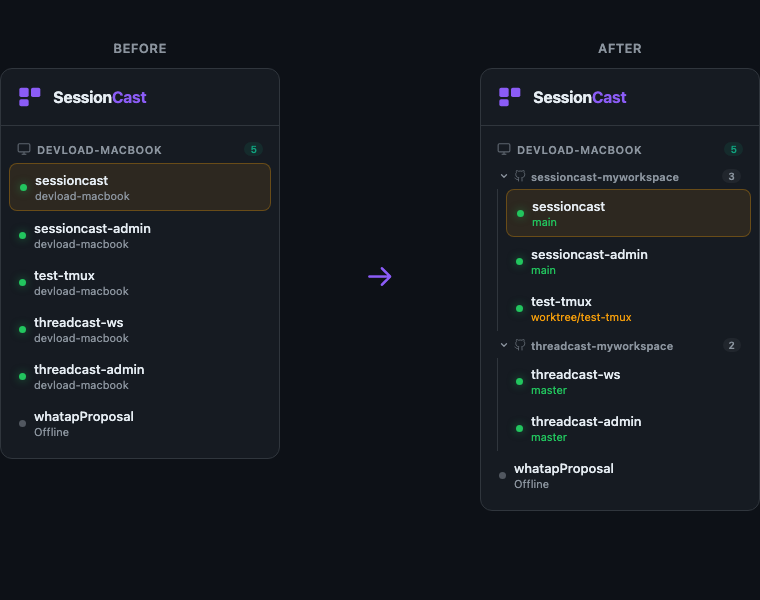
What Changed
Previously, all sessions under a machine were listed flat — making it hard to tell which sessions belong to the same project. Now, sessions sharing the same gitRepo are visually grouped together with a collapsible header.
- Repo subgroup header — shows the repository name, a git icon, and a session count badge
- Branch info — each session now displays its
gitBranch(e.g.main,master,worktree/feature) instead of repeating the machine name - Collapse/expand — click the subgroup header to toggle visibility
- Single-session groups — if only one session exists for a repo, no extra header is shown
How Grouping Works
- If the session reports a
gitRepo, that value is used as the group key - If no git info is available, the last folder name from the session's working directory is used
- Sessions are sorted within each group: online first, then alphabetical
Example
devload-macbook
  > sessioncast-myworkspace (3)
      sessioncast          main
      sessioncast-admin    main
      test-tmux            worktree/test-tmux
  > threadcast-myworkspace (2)
      threadcast-ws        master
      threadcast-admin     master
  whatapProposal           Offline
This makes it much easier to navigate when you have many sessions across multiple projects on the same machine.